

The Complete Guide to Claude Code Hooks: Automating Your AI Coding Workflow
# Generative AI
# Agentic AI
# AI Agents
# Claude Code
# MCP
Every lifecycle event, every hook, every use case. Explained.
June 16, 2026
Subham Kundu
Why Hooks Change Everything
If you’ve used Claude Code for more than a week, you’ve probably hit this moment: Claude writes some code, and you wish it would automatically run your linter. Or block a
rm -rf before it executes. Or load your team’s context on every session. Or kick off tests the moment a file changes.That’s what hooks are for.
Hooks are user-defined shell commands, HTTP endpoints, or even LLM prompts that execute automatically at specific points in Claude Code’s lifecycle. They turn Claude from a helpful assistant into a fully-integrated part of your engineering pipeline.
This post is a complete tour of every hook event available in Claude Code, when each one fires, and what you can actually do with them.
The Big Picture
Before we dive into individual hooks, here’s the full lifecycle at a glance. Hooks fire at three different cadences:
- Session-level: once per session (start, end, instruction loads)
- Turn-level: once per user prompt (submit, stop, compact)
- Tool-level: on every tool call inside the agentic loop (pre, post, permission)
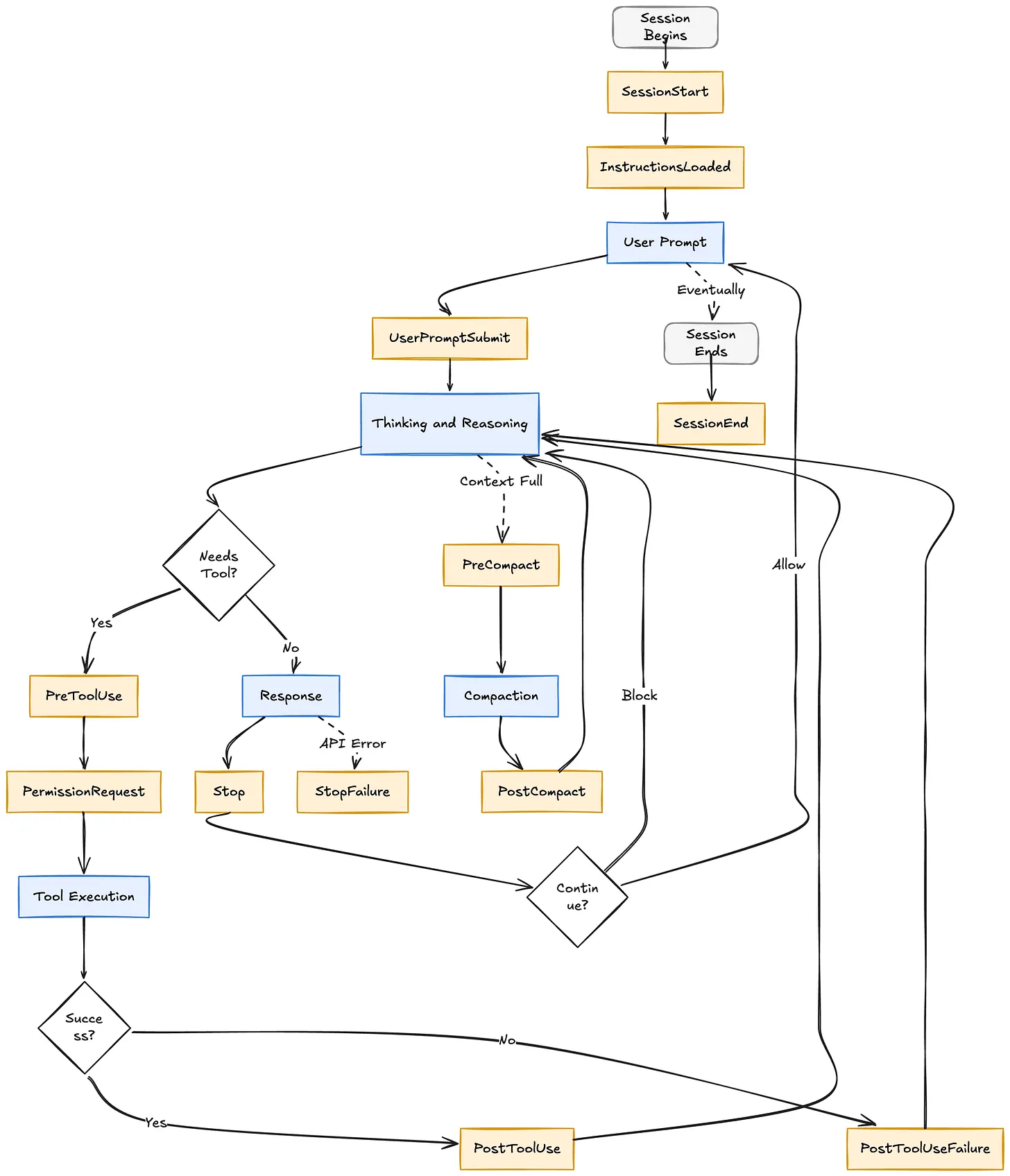
Now let’s walk through each group.
1. Session Lifecycle Hooks
These hooks fire when a session begins, ends, or when instruction files get loaded into context. Use them to prime Claude with context, log session metadata, or persist environment variables across the whole session.
Hooks in this group:
- SessionStart: Fires when a new session begins or resumes. Matchers include
startup,resume,clear,compact. Can inject context viaadditionalContextor persist env vars viaCLAUDE_ENV_FILE.
- SessionEnd: Fires when the session terminates. Matchers indicate the reason:
clear,logout,prompt_input_exit, etc. No decision control here, so use it for cleanup only.
- InstructionsLoaded: Fires each time a
CLAUDE.mdor.claude/rules/*.mdfile is loaded, either at session start or lazily during the session.

Use cases:
- Auto-load your team’s current sprint tickets into Claude’s context on
SessionStart
- Set up project-specific environment variables (Node version, API keys, feature flags) so every Bash command Claude runs has them
- Log session metadata to a metrics dashboard for auditing how the team uses Claude
- Clean up temporary files or close database connections on
SessionEnd
2. User Prompt Hooks
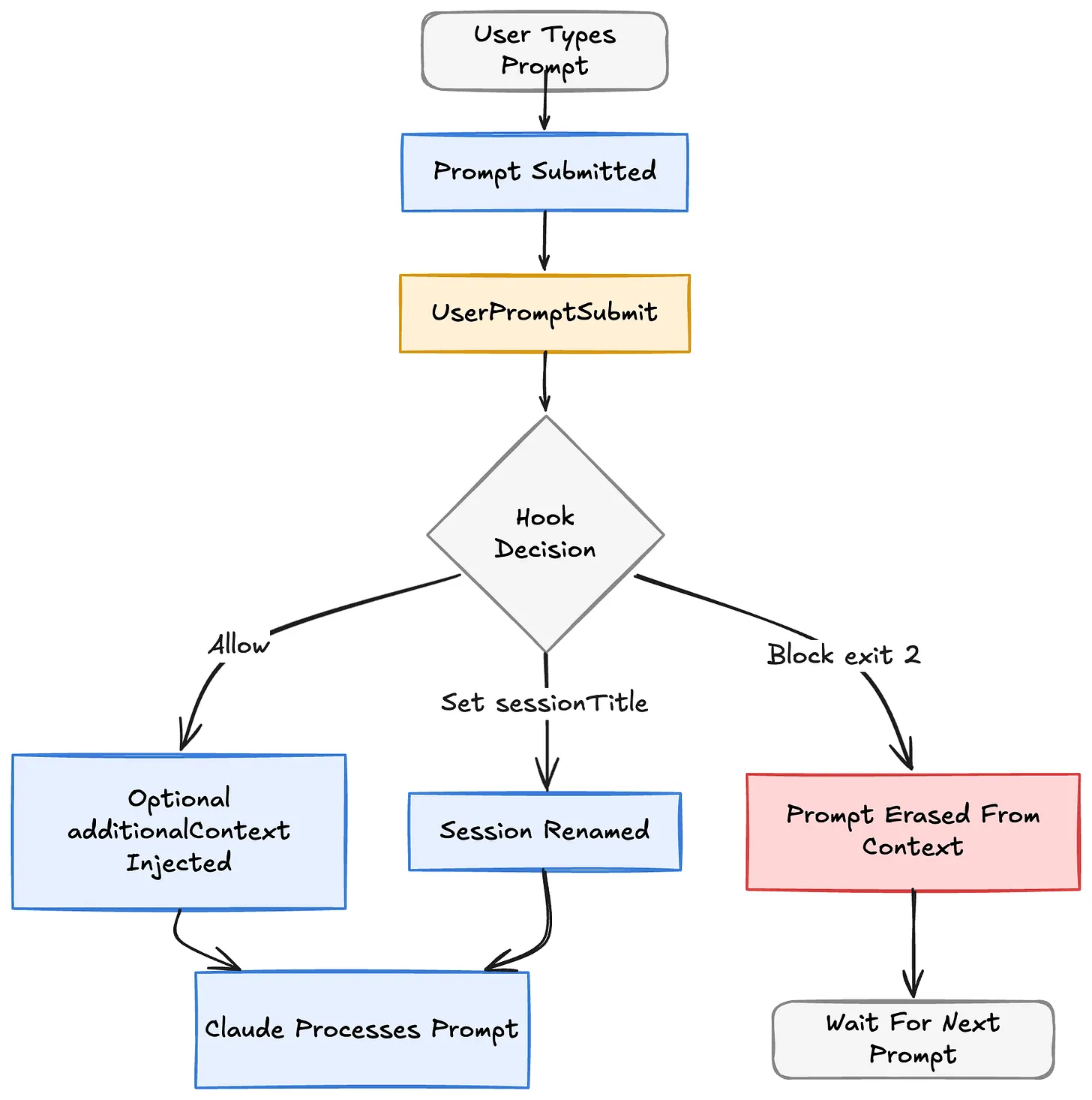
The moment you hit enter, Claude Code fires
UserPromptSubmit before sending anything to the model. This is your chance to intercept, enrich, or block what the user is asking.Hook in this group:
- UserPromptSubmit: Fires after the user submits a prompt but before Claude processes it. Can block the prompt entirely with exit code 2 or JSON
decision: "block", or enrich it withadditionalContext.
Use cases:
- Block prompts that contain production credentials or PII before they ever reach the model
- Automatically append repo-specific context (current branch, recent commits, open PRs) to every prompt
- Auto-generate session titles using
sessionTitlebased on the first prompt
- Route certain prompts to a specialized agent by injecting instructions via
additionalContext
3. Tool Execution Hooks
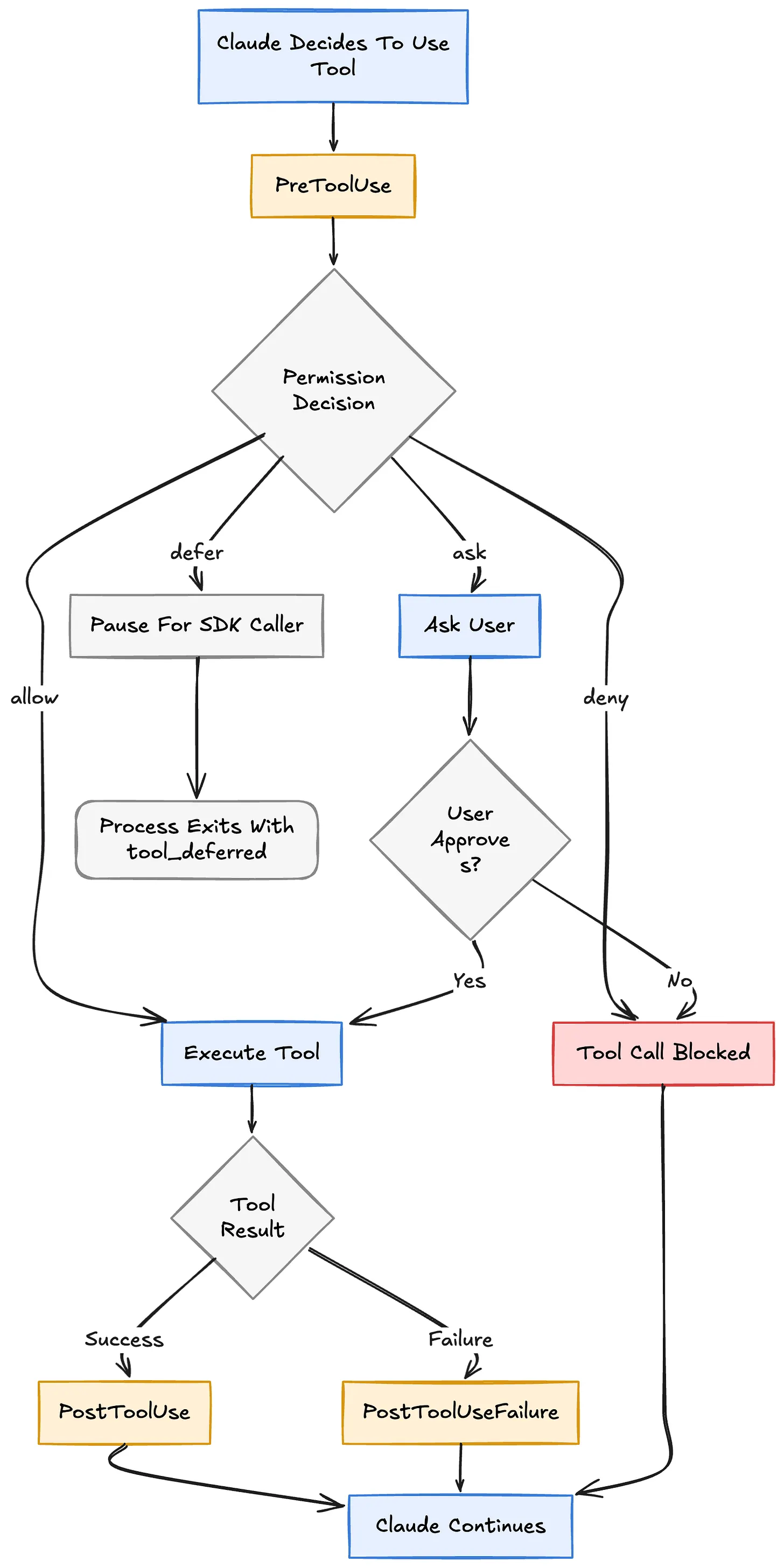
This is where most of the magic happens. Every time Claude wants to use a tool (Bash, Edit, Write, Read, WebSearch, MCP tools, anything) these hooks fire around the call.
Hooks in this group:
- PreToolUse: Runs before the tool executes. Can allow, deny, ask the user, or defer the call. Can also modify the tool’s input parameters via
updatedInput.
- PostToolUse: Runs after the tool succeeds. Can block Claude from continuing, inject additional context, or replace MCP tool output.
- PostToolUseFailure: Runs when a tool call fails. Use it to log errors, send alerts, or give Claude corrective feedback.
Use cases:
- Block destructive Bash commands (
rm -rf,DROP TABLE, force-push to main) before they run
- Auto-format and lint any file Claude edits via
PostToolUseon Edit/Write
- Automatically run tests after every code change and feed results back to Claude
- Rewrite npm/pip install commands to use the company mirror via
updatedInput
- Log every MCP tool call for audit trails in regulated environments
- Detect common tool failures (auth expired, rate limited) and tell Claude how to recover
4. Permission Hooks
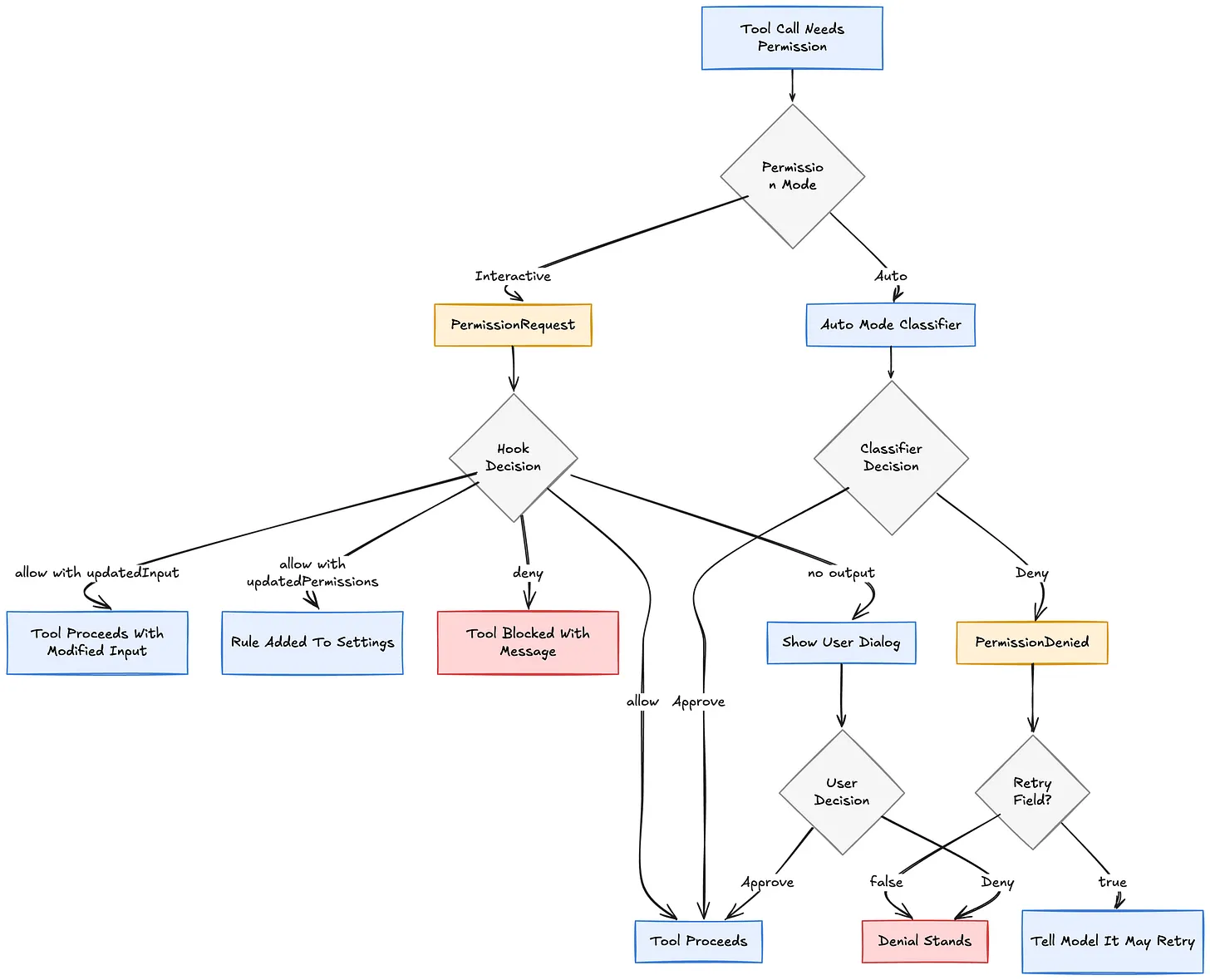
When Claude wants to do something that requires permission, Claude Code normally shows a dialog. These hooks let you approve or deny programmatically, or react when the auto-mode classifier denies a call.
Hooks in this group:
- PermissionRequest: Fires when a permission dialog would appear. Can auto-allow (with optional input modification), auto-deny, or add persistent permission rules.
- PermissionDenied: Fires when auto-mode denies a tool call. Read-only, but can tell the model it may retry via
retry: true.
Use cases:
- Auto-approve Bash commands that match a whitelist (read-only git ops, test commands, linters) without prompting
- Auto-deny writes to sensitive paths (
.env,secrets/,production/)
- Automatically add “always allow” rules based on which team member is using Claude
- Tell Claude to retry a denied tool call with a different approach
- Log every permission decision for compliance and later auditing
- Modify tool input at permission time (e.g., force a dry-run flag)
5. Subagent & Task Hooks
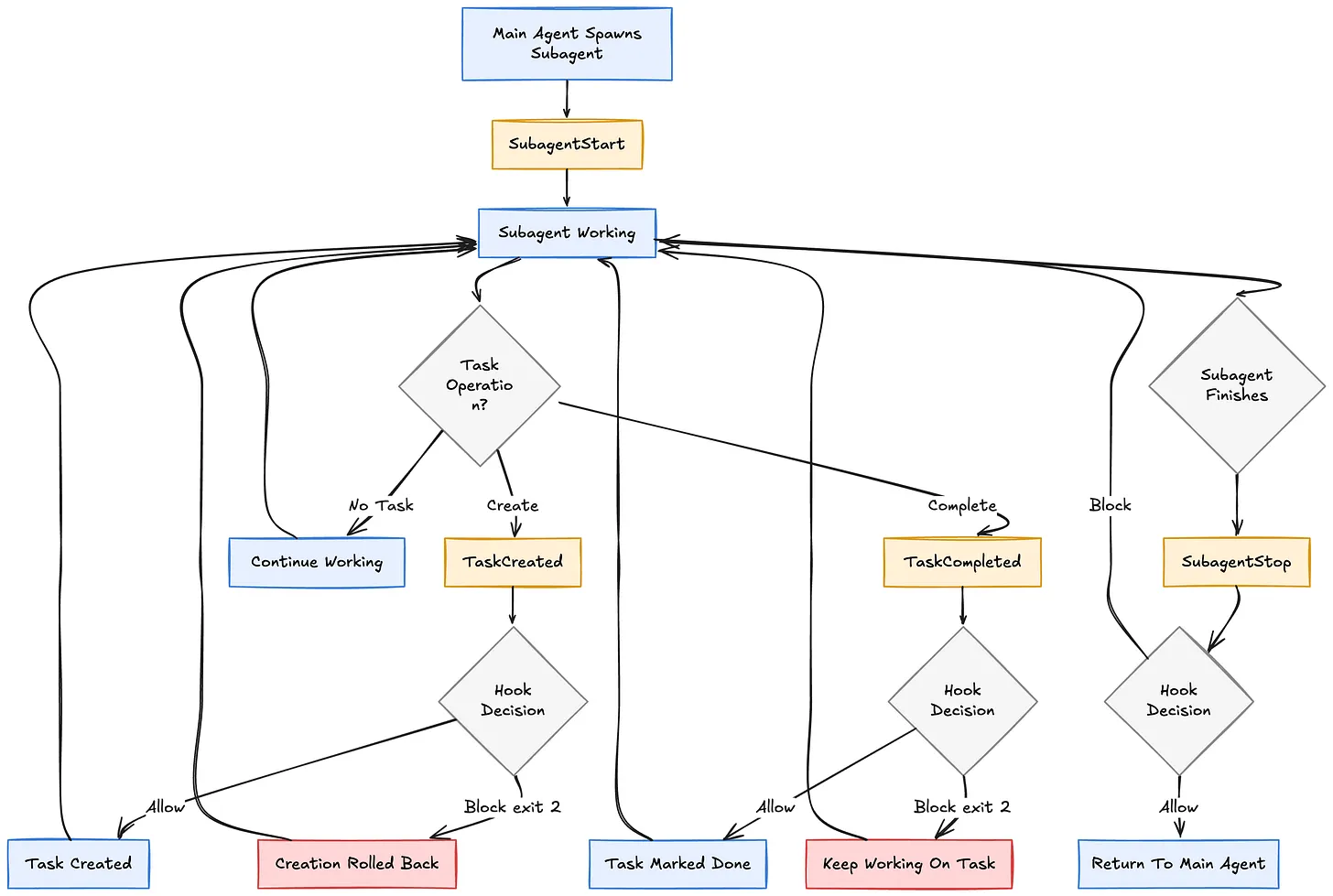
Claude Code can spawn subagents (via the Agent tool) and manage tasks through its task system. These hooks let you observe and control that nested activity.
Hooks in this group:
- SubagentStart: Fires when a subagent is spawned. Can inject context just for the subagent.
- SubagentStop: Fires when the subagent finishes. Can block the subagent from stopping.
- TaskCreated: Fires when a task is being created. Can block creation if it doesn’t meet criteria.
- TaskCompleted: Fires when a task is marked complete. Can block completion if tests fail or criteria aren’t met.
Use cases:
- Enforce that every task subject starts with a ticket ID like
[PROJ-123]
- Block task completion until the full test suite passes
- Inject security guidelines into every subagent that does code exploration
- Track subagent execution times in a metrics system for performance analysis
- Prevent Explore subagents from accessing certain directories
- Require a linked design doc before any task involving architecture changes can be created
6. Stop & Completion Hooks
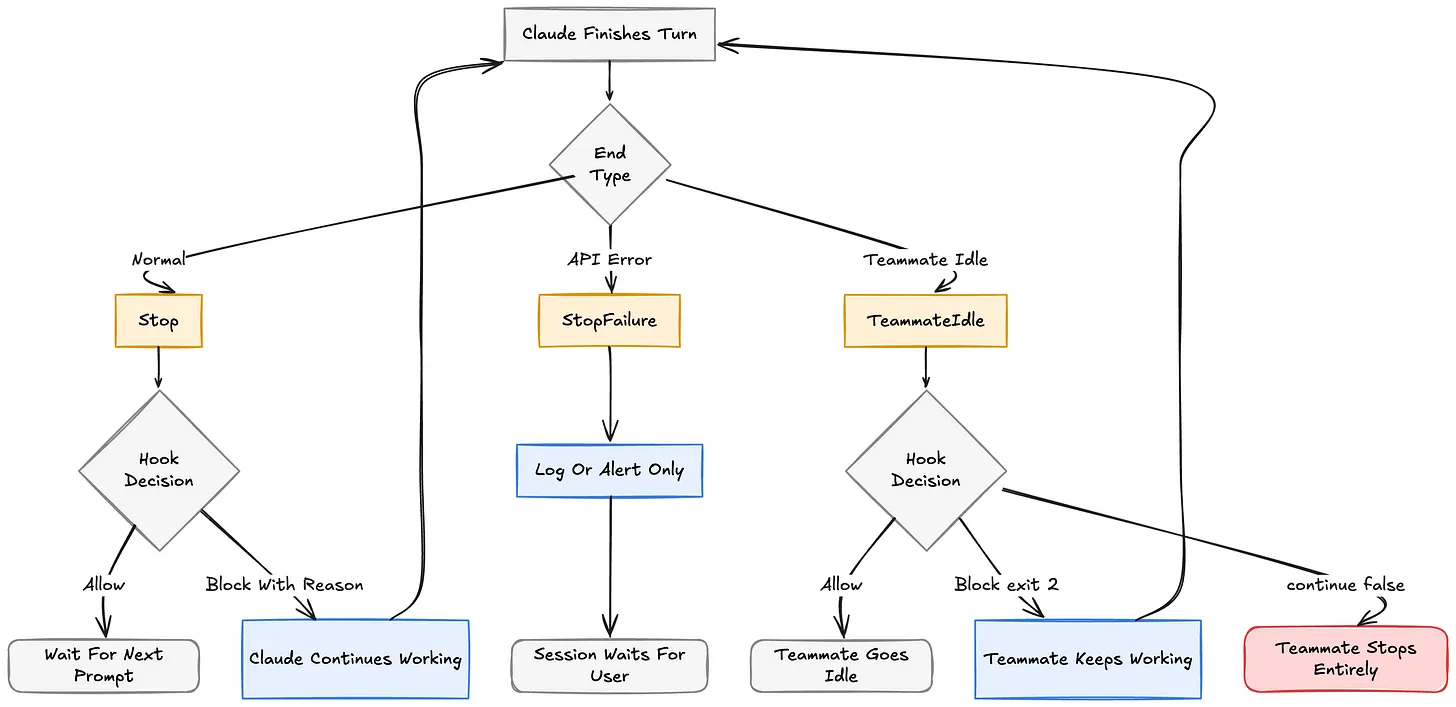
When Claude finishes a turn, these hooks decide whether it really gets to stop or whether there’s more work to do.
Hooks in this group:
- Stop: Fires when the main agent finishes responding. Can force Claude to continue working by returning
decision: "block"with a reason.
- StopFailure: Fires instead of Stop when the turn ends due to an API error (rate limit, auth failure, etc.). Observation only.
- TeammateIdle: Fires when an agent-team teammate is about to go idle. Can require more work before allowing idle state.
Use cases:
- Prevent Claude from stopping until all TODOs in the changed files are resolved
- Require passing lint and type checks before any Stop is allowed
- Auto-retry on transient API errors by detecting rate_limit in StopFailure
- Send a Slack notification when a teammate hits an auth error
- Block teammate idle until a CI pipeline has been triggered
- Verify build artifacts exist before letting a subagent close out
7. Compaction Hooks
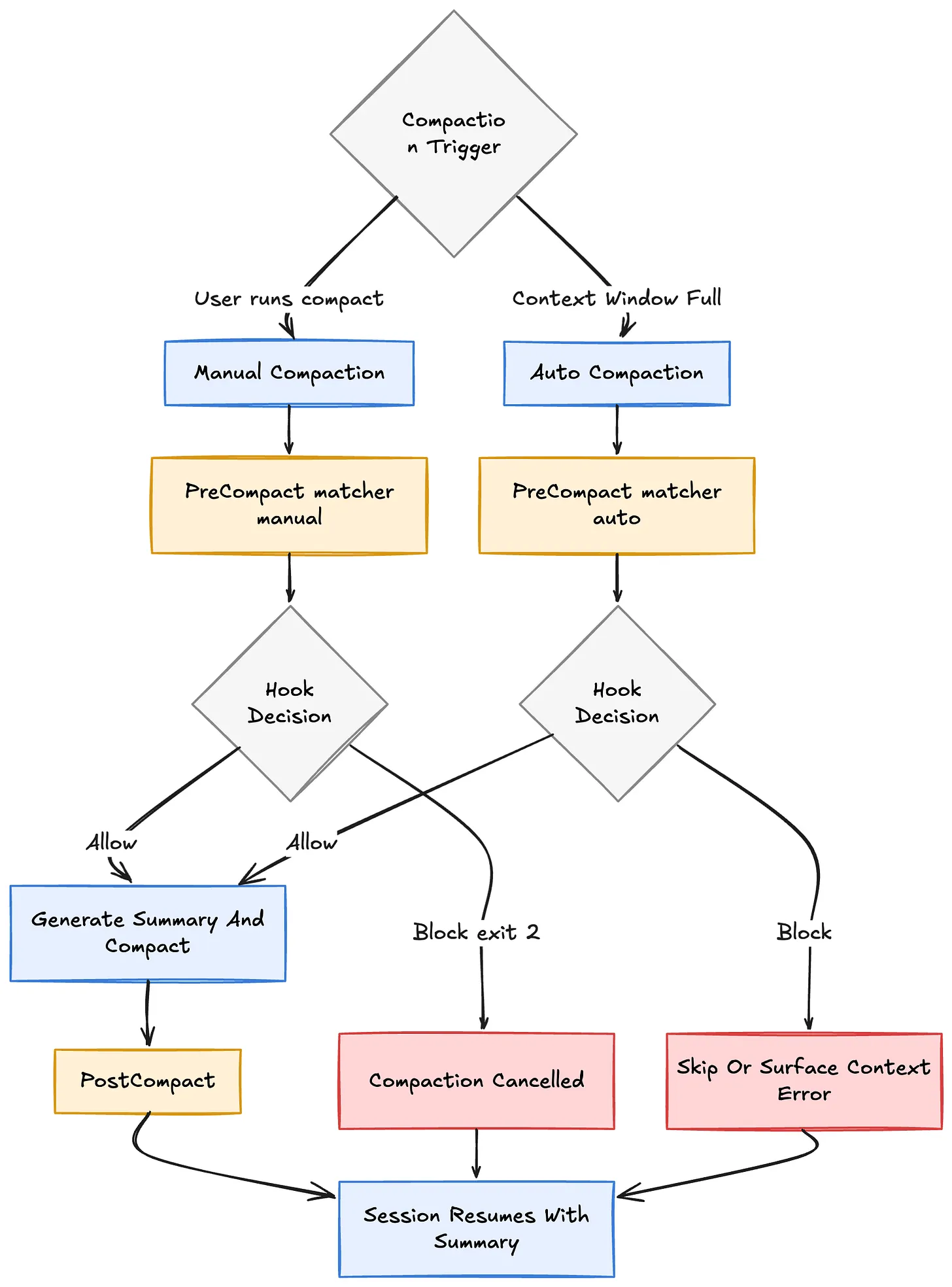
When the context window fills up, Claude Code compacts the conversation, summarizing older turns to make room. These hooks let you control when and how that happens.
Hooks in this group:
- PreCompact: Fires before compaction. Can block it (which aborts auto-compact or cancels a manual
/compact).
- PostCompact: Fires after compaction completes. Observation only. Receives the generated summary.
Use cases:
- Block manual
/compactunless the user passes specific instructions
- Archive the full conversation to external storage before compaction drops context
- Log compaction events with the generated summary for later review
- Detect when context windows are filling too fast and warn the user
- Save pre-compaction state so you can restore important context after if needed
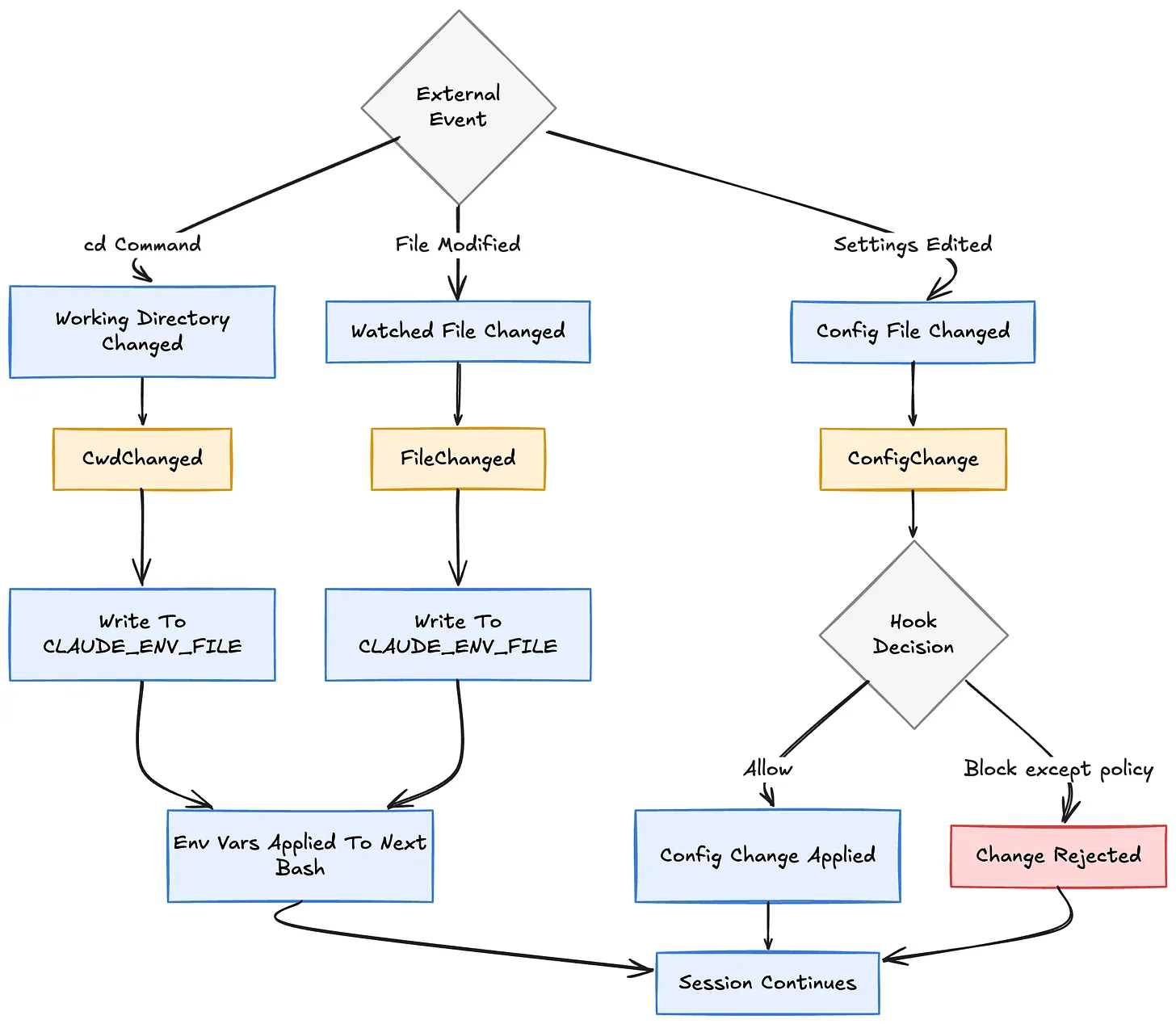
8. File & Environment Hooks
These hooks let Claude Code react to changes in the filesystem or working environment. Perfect for direnv-style workflows or reactive configuration.
Hooks in this group:
- CwdChanged: Fires when the working directory changes (e.g., Claude runs
cd). Has access toCLAUDE_ENV_FILEfor persisting env vars.
- FileChanged: Fires when a watched file changes on disk. The
matcherfield specifies filenames to watch.
- ConfigChange: Fires when a settings file changes during a session. Can block the change.
Use cases:
- Reload Node/Python versions automatically when Claude cd’s into a different project
- Pick up new
.envvalues the moment the file changes on disk
- Block unauthorized changes to
.claude/settings.jsonoutside of code review
- Auto-activate the right conda environment based on directory
- Watch
package.jsonand reinstall dependencies when it changes
- Audit every config change for compliance, including who/when/what changed
9. Worktree Hooks
If you use
claude --worktree or subagents with isolation: "worktree" , Claude Code creates an isolated working copy. These hooks let you use alternative version control systems (SVN, Perforce, Mercurial) or run custom setup.Hooks in this group:
- WorktreeCreate: Replaces the default git worktree behavior. Must return the absolute path to the new worktree.
- WorktreeRemove: Fires when a worktree is being cleaned up. Use it to clean up state that WorktreeCreate set up.
Use cases:
- Use SVN, Mercurial, or Perforce instead of git for isolated sessions
- Copy
.envand other gitignored config files into new worktrees automatically
- Register new worktrees with an internal tracking system
- Archive worktree state before cleanup for debugging failed subagent runs
- Apply custom permissions or ownership to worktree directories on creation
10. MCP Elicitation & Notification Hooks
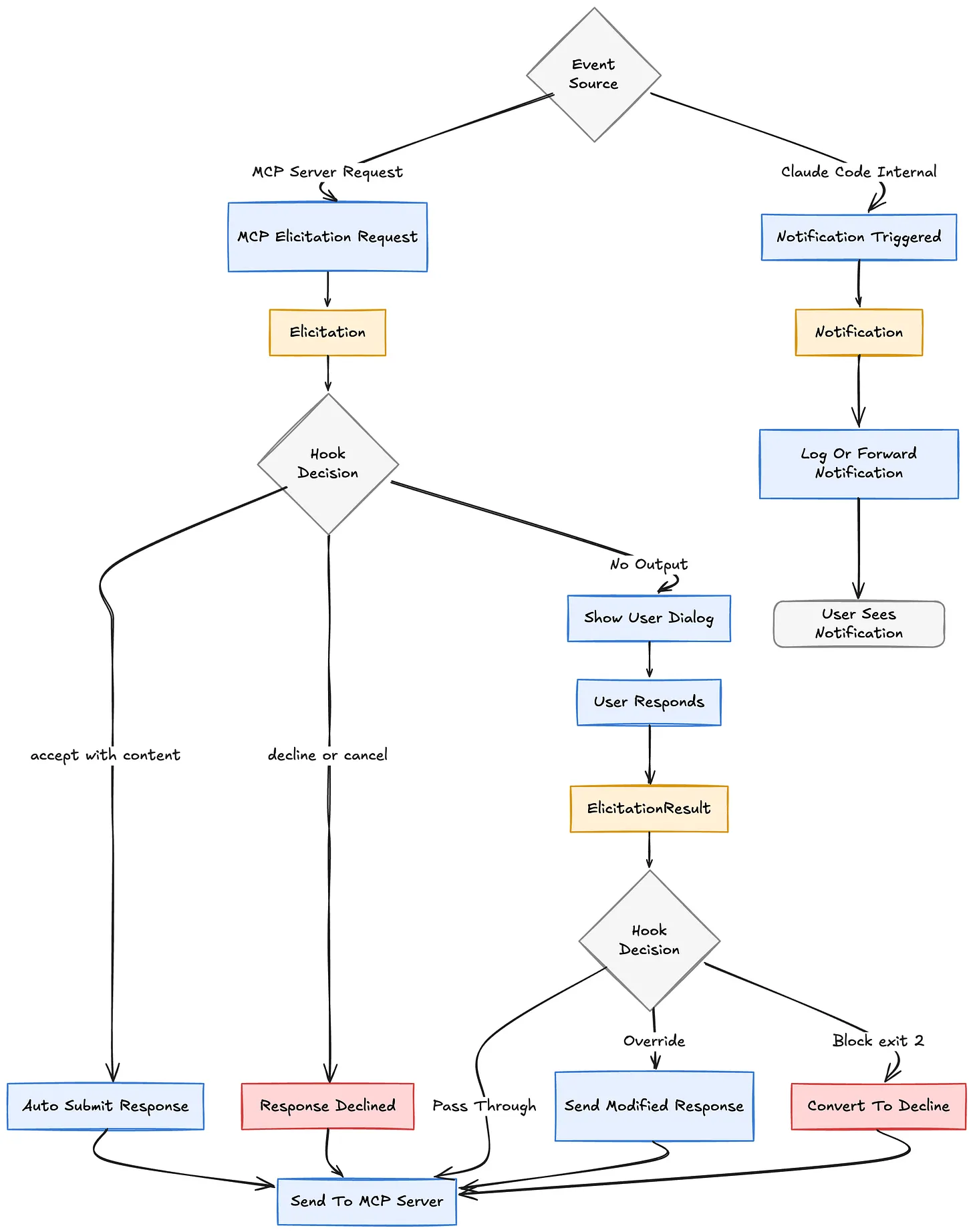
MCP servers can request input from the user mid-task. These hooks let you intercept, auto-respond, or observe those requests, plus handle general Claude Code notifications.
Hooks in this group:
- Elicitation: Fires when an MCP server requests user input. Can auto-accept, decline, or cancel without showing a dialog.
- ElicitationResult: Fires after the user responds, before the answer goes back to the MCP server. Can override the user’s response.
- Notification: Fires when Claude Code shows any notification (permission prompt, idle prompt, auth success, elicitation dialog).
Use cases:
- Auto-fill MCP authentication prompts from your secret manager
- Desktop-notify the team chat whenever Claude needs a permission decision
- Log every MCP elicitation for audit purposes
- Override user answers in certain regulated flows (e.g., force multi-factor confirmation)
- Send a phone alert when Claude has been idle too long on a long-running task
- Route elicitation requests to a Slack channel for async team approval
Hook Handler Types
Every hook you configure is one of four handler types:
- command: Runs a shell command. Receives JSON on stdin, returns decisions via exit code or stdout JSON. This is the workhorse.
- http: Sends the hook input as a POST request to a URL. Great for integrating with internal services without writing shell scripts on every dev’s machine.
- prompt: Sends the hook input to a fast Claude model that returns a yes/no decision. Useful when the decision needs judgment, not just regex matching.
- agent: Spawns a full subagent with tool access (Read, Grep, Glob) that can investigate before deciding. Heavier-weight but powerful for verification that needs to inspect actual files.
Command hooks also support an
async: true flag, which runs them in the background so Claude keeps working. Perfect for long test suites, deployments, or external API calls where you don’t need the result to block the current turn.Where to Define Hooks
Hooks can live in several places, each with different scope:
-
~/.claude/settings.json: applies to all your projects, local to your machine
-
.claude/settings.json: project-scoped, commits to the repo (shareable)
-
.claude/settings.local.json: project-scoped but gitignored (personal overrides)
- Plugin
hooks/hooks.json: bundled with a plugin, activates when the plugin is enabled
- Skill or agent frontmatter: scoped to the component’s lifecycle
- Managed policy settings: organization-wide, admin-controlled
Type
/hooks in Claude Code to browse everything that’s currently configured and where it came from.Final Thoughts
Hooks are the difference between Claude Code as a clever autocomplete and Claude Code as a first-class citizen in your engineering workflow. Start small. A lint-on-write
PostToolUse hook and a rm -rf blocker in PreToolUse will already change how much you trust Claude to work autonomously. From there, the lifecycle is your playground.If you build something interesting, share it. The community is still figuring out what’s possible, and every hook someone publishes is a pattern the rest of us can learn from.
If you want to discuss generative AI with me, feel free to connect with me at LinkedIn https://www.linkedin.com/in/subham-kundu-2746b515b/
Originally posted @ https://cenrax.substack.com/p/the-complete-guide-to-claude-code?triedRedirect=true
Dive in
Related
Blog
The Illustrated Guide on How to Use AI Coding Platforms
By Subham Kundu • Mar 24th, 2026 • Views 181
Video
From A Coding Startup to AI Development in the Enterprise
By Ryan Carson • May 10th, 2024 • Views 639
Blog
The 5xP Framework: Steering AI Coding Agents from Chaos to Success
By Médéric Hurier • Apr 21st, 2026 • Views 213
Blog
Supagents: One Source to Rule Your Coding Subagents
By Médéric Hurier • Jun 23rd, 2026 • Views 71
Blog
The Illustrated Guide on How to Use AI Coding Platforms
By Subham Kundu • Mar 24th, 2026 • Views 181
Blog
The 5xP Framework: Steering AI Coding Agents from Chaos to Success
By Médéric Hurier • Apr 21st, 2026 • Views 213
Blog
Supagents: One Source to Rule Your Coding Subagents
By Médéric Hurier • Jun 23rd, 2026 • Views 71
Video
From A Coding Startup to AI Development in the Enterprise
By Ryan Carson • May 10th, 2024 • Views 639