

Ackgent: Rapid Agent Development on GCP with ADK and Agent Config
# AI Agents
# Generative AI Agents
# Artificial Intelligence
# Google ADK
# Data Science
Accelerate your AI agent lifecycle by shifting from imperative coding to declarative configuration using Google ADK and the new Ackgent starter kit
December 2, 2025
Médéric Hurier
The AI agent landscape is exploding, but development speed is hitting a wall. We need a faster, more accessible way to build and iterate. In my current role, I spend my days optimizing the experience of building and deploying AI agents. I’ve witnessed firsthand the incredible use cases my customers’ developers — agents that streamline complex workflows, automate intricate decision-making, and unlock new data insights. The potential is massive, but the reality of development is often friction-filled.
Despite the advancements in foundational models, the process of taking an agent from concept to production remains too slow and overly complex. Developers get bogged down in boilerplate code, infrastructure wrangling, and the mechanics of tool integration, rather than focusing on the actual logic and value the agent provides. We drastically need to improve the speed at which we can iterate, while simultaneously making the whole process more accessible to a broader range of builders. Enter Ackgent , a demonstration of how Google ADK and Agent Config can be use to quickly build and deploy AI agents with a declarative approach.

Source: Gemini App
The Shift from Imperative to Declarative
The traditional approach to building agents is largely imperative. You write Python (or similar) code detailing exactly how the agent should execute tasks, manage state, call tools, and handle errors. This offers maximum control but comes at the cost of speed and simplicity.
What if we could shift to a declarative approach? What if we could define what the agent should do, and let a robust framework handle the execution? This is the promise of Agent Config , a new feature of Agent Developer Kit (ADK) introduced in the release v.1.12.0 .
Agent Config allows developers to define the entire behavior of an agent — its goals, instructions, tools, and integrations — using a structured configuration file written in YAML. This addresses both the need for speed and the need for accessibility.
The central insight here is that config helps you focus on the use case, not the code. By abstracting the underlying mechanics, developers, prompt engineers, and product managers can rapidly prototype and test different agent behaviors simply by editing a YAML file.
Flexibility Without the Boilerplate
Crucially, adopting a declarative approach doesn’t mean sacrificing power or flexibility. Agent Config is designed to be extensible. While the core orchestration is handled by the framework, it provides clear pathways for integrating essential components:
External Tools: You can easily connect your agents to real-world APIs, databases, and services.
Callbacks: Hooks are available to inject custom Python logic at specific points in the agent lifecycle (e.g., for pre-processing input, validating output, logging, or monitoring).
MCP (Multi-agent Communication Protocol) Servers: Agent Config supports integration with MCP servers, enabling sophisticated communication, governance, and orchestration in complex multi-agent systems.
Introducing Ackgent: The Agent Config Starter Kit
To help teams adopt this powerful paradigm, I’ve created a new GitHub repository: Ackgent . This repository a demonstration on how to leverage ADK Agent Config within a modern, production-ready Python environment.
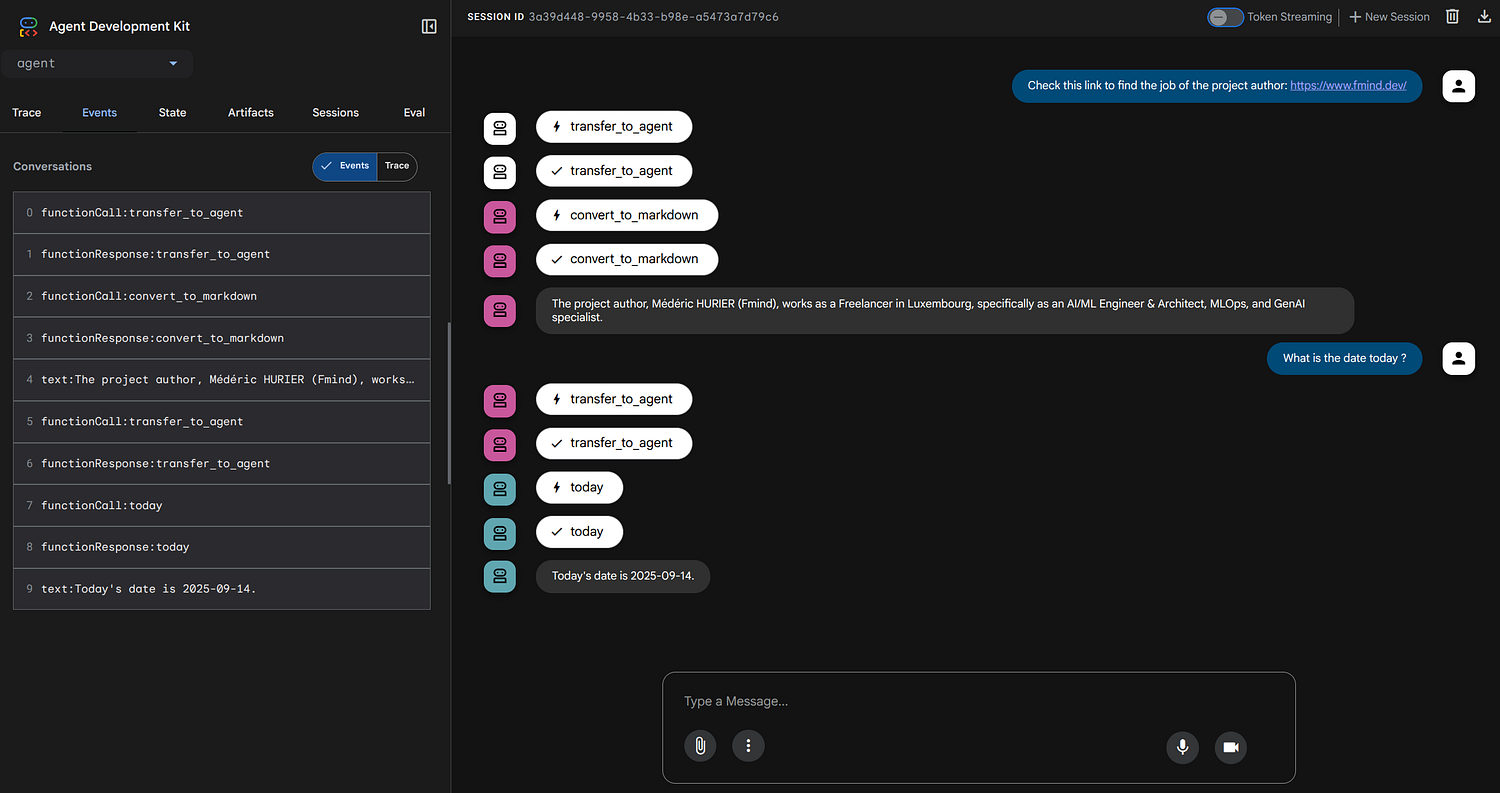
This template encapsulates best practices for structuring a project where configuration is the core, supported by a suite of modern development tools.
Repository Features: A Modern Stack
The Ackgent repository is built with efficiency, robustness, and Developer Experience (DX) in mind:
Modern Python Management with
uv : We leverage uv (the blazing-fast Python package manager written in Rust) to streamline dependency resolution and virtual environment management, significantly speeding up setup and CI/CD pipelines.Task Execution with
just : just serves as a convenient command runner, simplifying common tasks like installing dependencies with just project or deploying to the cloud with just deploy .Code Quality Tooling: Integrated
pre-commit hooks ensure code quality and consistency from the start, utilizing formatters and linters like check-toml , check-yaml , or check-json .evalset Configuration: The repository includes ADK capability for defining and running evaluation datasets ( evalset ), crucial for rigorously testing and benchmarking agent performance iteratively.Customizable Cloud Run Deployment: Designed for scalability, the example includes configurations and
just recipes for deploying the agents as serverless containers on Google Cloud Run .Advanced Agent Capabilities: Demonstrations of Tools, Callbacks, and MCP integration within the Agent Config framework.
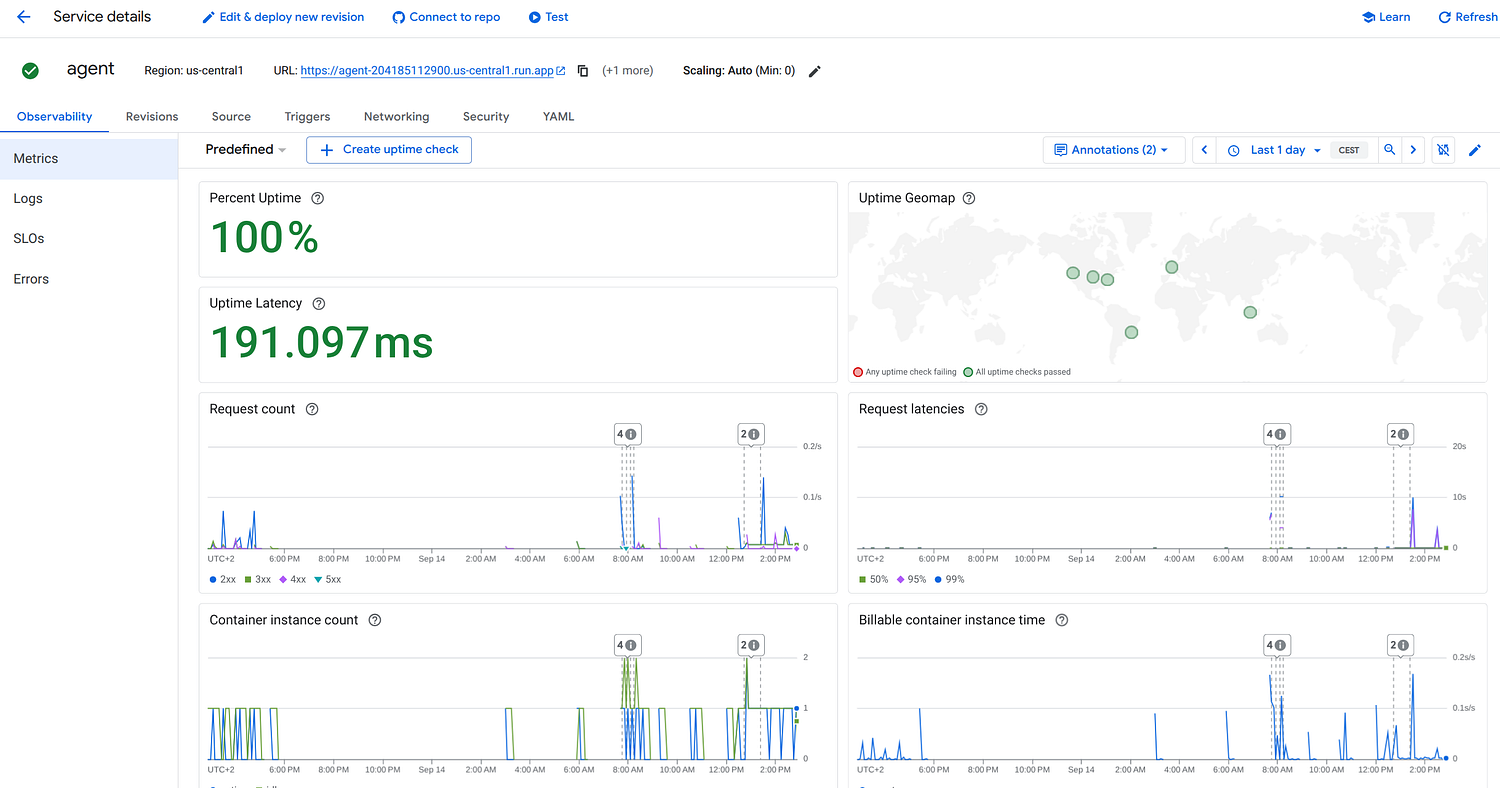
Ackgent on Cloud Run gives you access to key metrics, logs, SLOs and Error to better observe your agent in production
Architecture Overview
The Ackgent example utilizes a modular architecture centered around the ADK framework. The core concept is the separation of concerns: the agent behavior (the “what”) is defined in YAML files, while the implementations (the “how” — tools, callbacks, and MCP connections) are written in Python.
The ADK framework acts as the runtime engine. It parses the Agent Config YAML, initializes the specified LLM, and orchestrates the flow of conversation. When a request is received (e.g., via the Cloud Run endpoint), the runtime identifies the target agent. When the LLM decides to use a tool or delegate to another agent, ADK handles the execution via the implementation references provided in the configuration.
This separation of concerns — behavior in YAML, execution handled by ADK, and specialized logic in Python — is what enables rapid iteration.
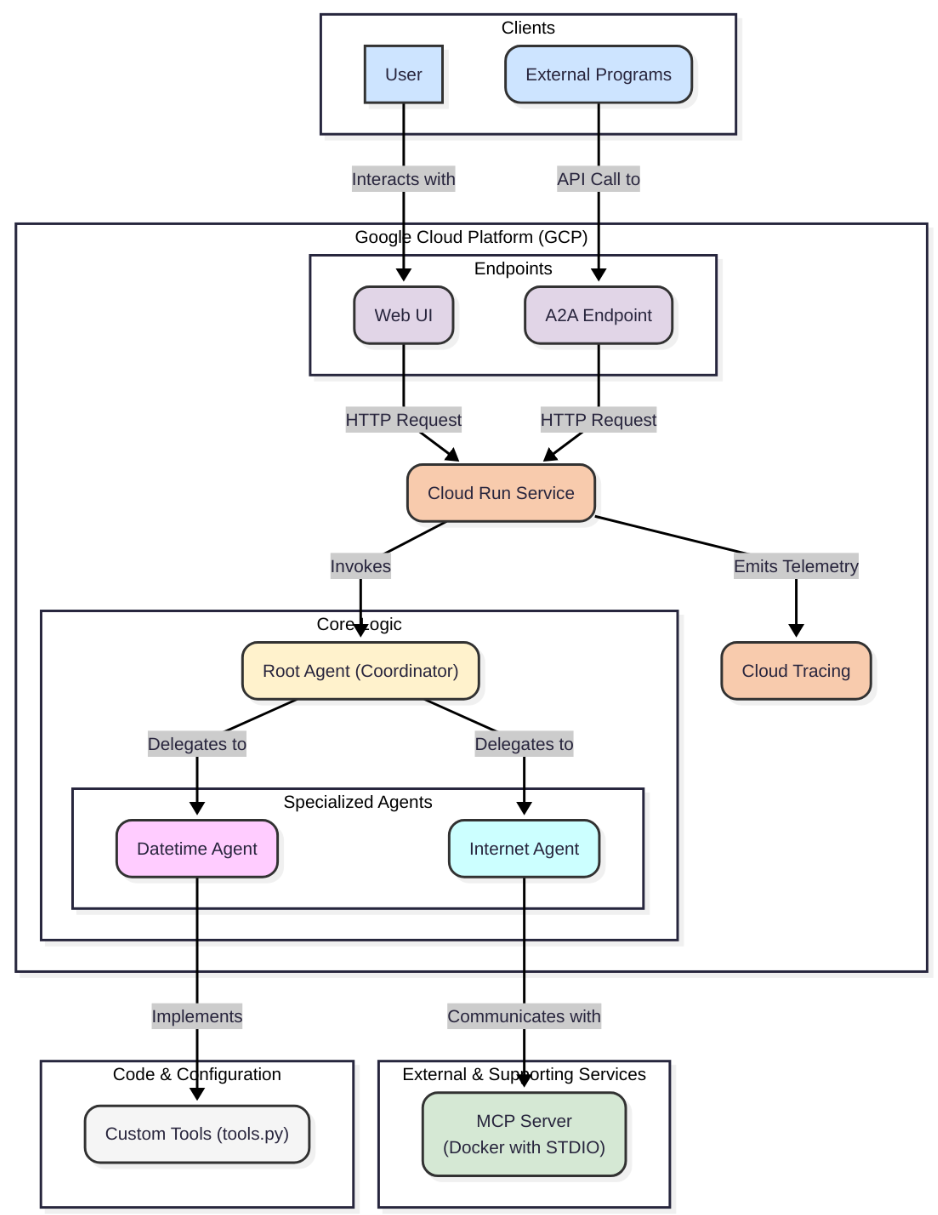
Architecture of the Ackgent example with 3 Agents: Root (Dispatcher), Datetime (Tools), and Internet (MCP)
Under the Hood: Defining Agents with YAML
Let’s look at how this works in practice. The Ackgent repository showcases three distinct agents, demonstrating the core capabilities of the Agent Config approach. Notice how minimal the Python code is, focusing mainly on tool implementation, while the behavior is entirely in YAML.
1. The Datetime Agent (Custom Tools)
The datetime agent demonstrates how to extend an agent with external tools tools. The agent can access the current date and time defined in the tools.py of the repository, which are defined as simple functions.
2. The Internet Agent (Search Tools)
The Internet agent is configured to access an external MCP Server. In this case, we are using markdown-mcp , a server developed by Microsoft to quickly retrieve any source into a markdown, including external links. The MCP is started as a STDIO server, with a timeout of 10 seconds.
3. The Root Agent (Coordination and Routing)
The root agent acts as the main entry point. It doesn't perform tasks itself; instead, its primary function is orchestration. It analyzes the user's intent and intelligently delegates the task to the most appropriate specialized agent using the
sub_agents configuration. This pattern enables a scalable and modular multi-agent system.Current Limitations
While Agent Config is a great helper for quickly building agents, it’s important to be aware of the current constraints within the ADK framework as it evolves.
One notable limitation today involves mixing different types of capabilities within a single agent definition. Currently, you cannot configure an agent that simultaneously uses “Built-In Search Tools” with
google_search or VertexAiSearchTool alongside "Non-Search Tools" (like the custom Python functions) or "Sub-Agents" (like the root agent uses).The ADK team is actively working on enhancing this flexibility. For now, the recommended architecture — as demonstrated in the Ackgent repository — is either to separate concerns into specialized agents, or create custom search tools (e.g., like the
markitdown-mcp server).The Future: Democratizing Agent Creation
ADK Agent Config is more than just a feature; it’s a foundational shift in agent development from imperative to declarative.
Based on Agent Config, Ackgent offers an immediate boost in productivity. It streamlines the development lifecycle, reduces boilerplate, and makes testing and deployment significantly faster. This template repository provides a concrete starting point to leverage these benefits today.
But the long-term vision is even more exciting. Because the agent’s behavior is defined declaratively in a structured, human-readable format (YAML), it opens the door for non-technical users — what we might call “digital users” — to build their own agents. Imagine a future where a UI allows business analysts or domain experts to visually construct complex agents by defining instructions and plugging in tools — all powered by Agent Config under the hood.
We are moving towards a future where the ability to create AI agents is truly democratized. I encourage you to explore the repository, try out the examples, and experience the speed and simplicity of declarative agent development.

Source: Gemini App
Dive in
Related
Video
AI Agent Development Tradeoffs You NEED to Know
By Sherwood Callaway • Jul 22nd, 2025 • Views 197
Video
Accelerating Production Agent Development with Community-Driven Stacks // Panel 1
By Ben Epstein • Nov 27th, 2025 • Views 53
Video
Impact of LLMs on the Tech Stack and Product Development
By Anand Das • Nov 2nd, 2023 • Views 467
Video
Accelerating Production Agent Development with Community-Driven Stacks // Panel 1
By Ben Epstein • Nov 27th, 2025 • Views 53
Video
Impact of LLMs on the Tech Stack and Product Development
By Anand Das • Nov 2nd, 2023 • Views 467
Video
AI Agent Development Tradeoffs You NEED to Know
By Sherwood Callaway • Jul 22nd, 2025 • Views 197