

The Illustrated Guide on How to Use AI Coding Platforms

# AI Coding
# Software Engineering
# AI Assistants
Your visual playbook for getting the most out of AI-assisted development — from first prompt to production-ready code.
March 24, 2026
Subham Kundu
Most developers start using AI coding platforms the same way: they open a chat, type a vague request, and hope for magic. Some get lucky. Most end up frustrated, blaming the tool for producing spaghetti code or hallucinating entire libraries that don’t exist.
The problem isn’t the tool. It’s how you’re using it.
After studying how top engineers work with AI coding assistants, a clear set of patterns has emerged — along with a graveyard of anti-patterns that trip up even experienced developers. This guide breaks down everything visually, so you can see the workflows, understand the mental models, and start writing better code with AI today.
Part 1: The Fundamental Mental Model
Before touching a single feature, you need to internalize one idea: you are the architect, the AI is your junior engineer.
This isn’t a metaphor. It’s an operational framework. A junior engineer can write solid code — but only when given clear instructions, the right context, and firm boundaries. Left unsupervised, they’ll make hundreds of small decisions. Most will be fine. Some will quietly create a mess that takes weeks to untangle.
The same is true for AI coding assistants.
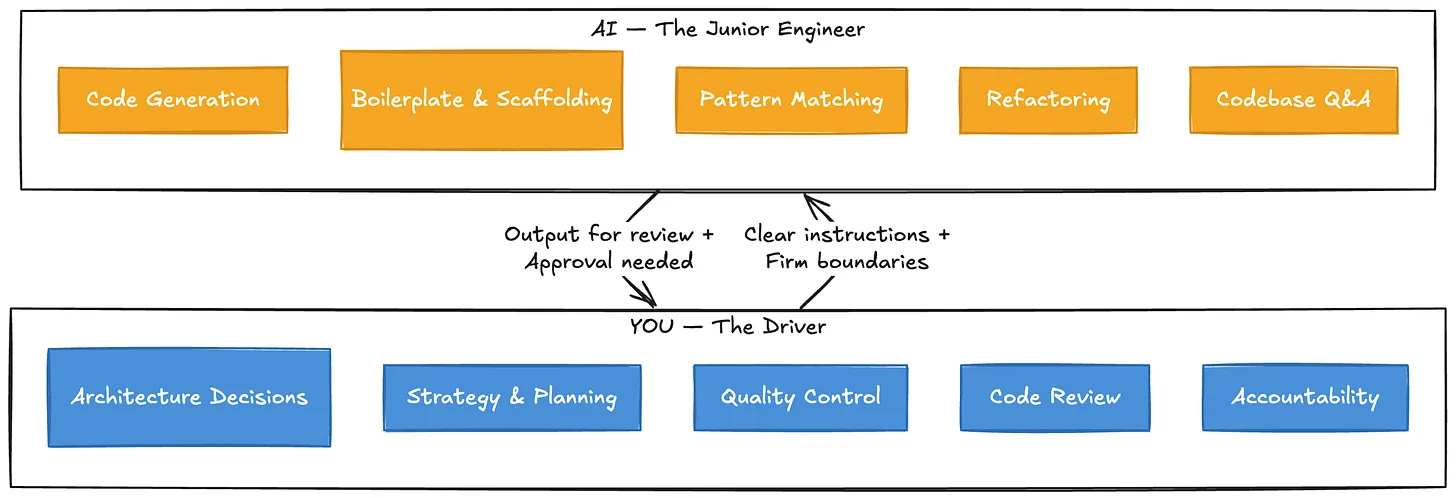
The diagram above captures the core relationship. You stay in the driver’s seat — owning architecture, strategy, and quality control. The AI handles execution within the lanes you define.
Part 2: The Workflow That Actually Works
The engineers who get the best results from AI coding platforms follow a remarkably consistent workflow. It’s not about typing faster or writing cleverer prompts. It’s about structure.
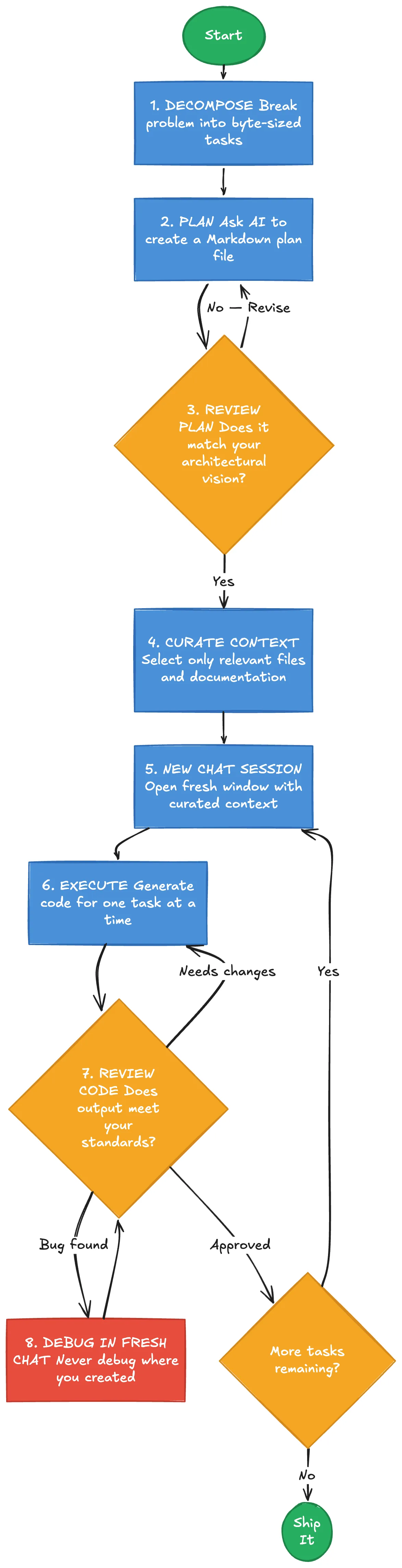
Let’s walk through each phase.
Phase 1: Break Down the Problem
The single most important skill isn’t prompting — it’s decomposition. Large, complex problems need to be broken into byte-sized tasks that the AI is more likely to accomplish successfully. Think of it this way: if you wouldn’t hand the entire task to a junior engineer in one go, don’t hand it to the AI in one go either.
A vague request like “Build me an authentication system” will produce something. But “Create a login endpoint that accepts email and password, validates against our existing User model, and returns a JWT token following the pattern in
auth/token.service.ts “ will produce something you can actually use.Phase 2: Plan Before You Code
Before generating a single line of code, ask the AI to build a plan. The most effective approach is to have it produce a Markdown file outlining the steps, decisions, and context needed. This serves two purposes: it forces the AI to think through the problem, and it gives you a document you can review and reference in future chat sessions.
This is sometimes called “Plan Mode” - and it’s the difference between controlled development and hoping for the best.
Phase 3: Manage Your Context
This is where most people go wrong, and it deserves its own section.
Part 3: The Context Window - What Nobody Tells You
Every AI model has a context window — the total amount of information it can “see” at once. Modern models advertise massive context windows (hundreds of thousands of tokens, sometimes a million). The temptation is to fill them up. After all, more context should mean better results, right?
Wrong.

Research shows that once a context window gets about 50% to 80% full, there is a steep drop-off in accuracy and a sharp rise in hallucinations. The AI starts losing track of what matters, mixing up details, and confidently generating code that looks right but isn’t.
The lesson is counterintuitive but critical: even if the model can take more data, keep the context pristine and as small as possible for the task at hand. Don’t throw the kitchen sink at it. Provide just enough relevant context for the specific task you’re working on.
This connects directly to the next anti-pattern.
Part 4: The Anti-Patterns (How NOT to Use AI Coding Platforms)
Understanding what not to do is just as valuable as knowing the right workflow. Here are the patterns that consistently produce bad results.
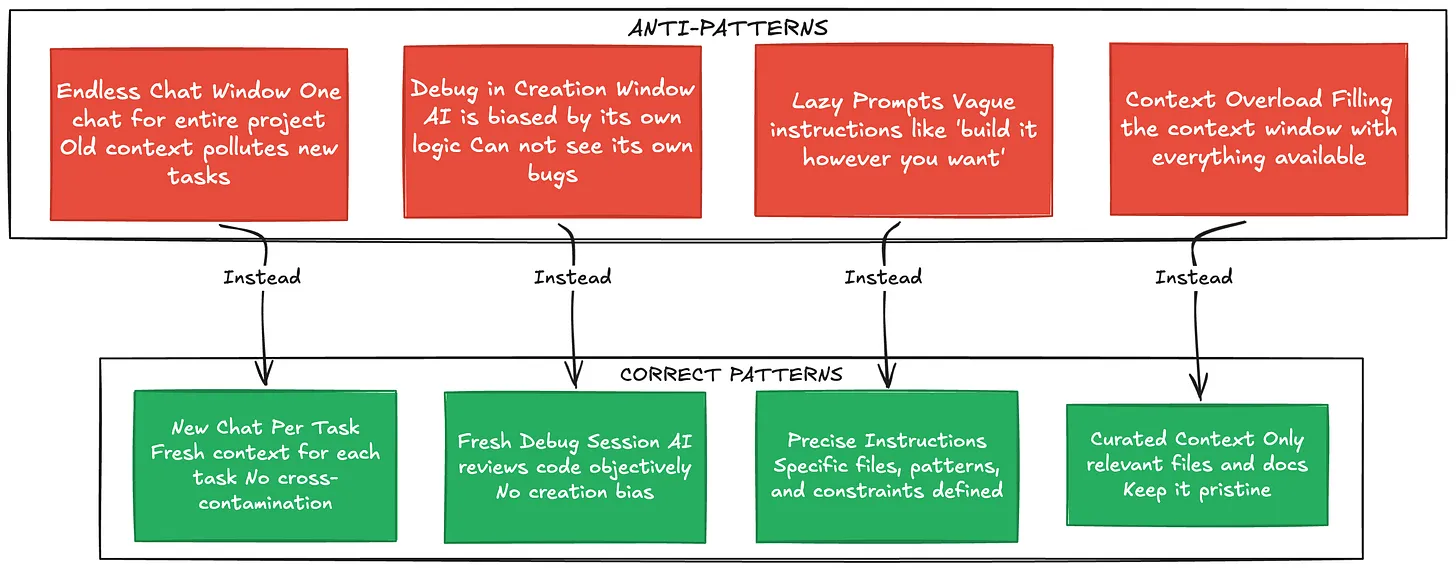
Anti-Pattern 1: The Endless Chat Window
Do not keep one chat window open for the entire lifecycle of a project. Every time you switch tasks, start a new chat. Old context from previous tasks doesn’t just sit there harmlessly — it actively confuses the AI. The model treats everything in its context as relevant, so leftover code from your authentication work will bleed into your payment processing task.
Anti-Pattern 2: Debugging in the Creation Window
This one is subtle and devastating. You build a feature in a chat session and encounter a bug. Your instinct is to say “Hey, there’s a bug — fix it” in the same window. Don’t do this.
The context window is filled with the logic that created the bug. The AI has already convinced itself that its approach was correct. It’s like asking someone to proofread their own essay immediately after writing it — they’ll read what they meant to write, not what’s actually on the page.
Start a fresh chat to debug. The AI will look at the code objectively, without the baggage of the previous conversation.
Anti-Pattern 3: Being Lazy with Prompts
The most dangerous pitfall is getting lulled into a false sense of security. The AI is fast and fluent, which makes it easy to use vague prompts and push off strategic decisions. “Just build it however you think is best” feels efficient until you realize the AI made dozens of arbitrary decisions — and 20% of them are wrong.
Part 5: Brownfield vs. Greenfield — Two Very Different Games
How you use an AI coding platform depends heavily on whether you’re working with existing code or starting from scratch. The strategies are almost opposite.
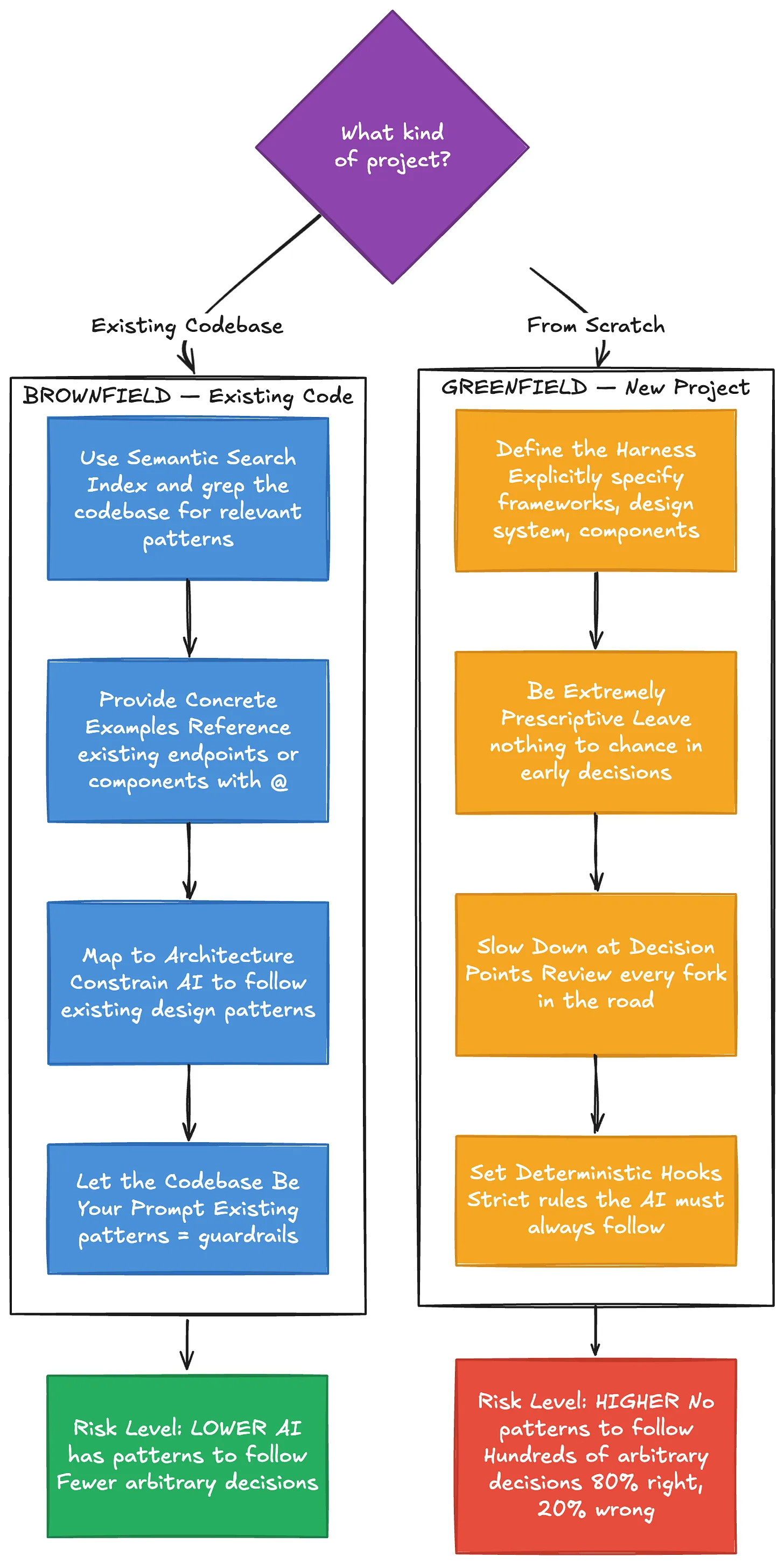
Working with Existing Code (Brownfield)
There’s a common myth that AI is bad at legacy code. The reality is the opposite — it’s actually safer to use AI in existing codebases. Why? Because the AI has existing patterns to follow, which minimizes the number of arbitrary decisions it needs to make.
The key techniques for brownfield work are all about leveraging what’s already there. Use the platform’s indexing to search through your codebase and find relevant code. When adding a feature — say, a new API endpoint — reference an existing, well-written endpoint and tell the AI: “Build it just like this one.” Use the
@ symbol to point directly at files, and let the existing architecture constrain the AI’s decisions.The codebase itself becomes your best prompt.
Starting from Scratch (Greenfield)
Greenfield projects are where things get dangerous. With no existing code to mimic, the AI has no guardrails. If you don’t guide it, it will make hundreds of small arbitrary decisions. Each one might be 80% likely to be correct — but compound 80% across hundreds of decisions and you end up with a mess.
The approach here is the opposite of “move fast.” You need to be extremely prescriptive early on. Define the harness — explicitly tell the AI which design system, components, and frameworks to use. Slow down at every architectural decision point. Set deterministic hooks: strict rules like “Never start a new dev server” or “Always use this specific component library.”
Think of it as building a fence before letting the AI run free in the field.
Part 6: Advanced Concepts and Mental Models
Beyond the core workflow, several deeper insights separate good AI-assisted developers from great ones.
Models Have Personalities
Different AI models behave differently, even on the same prompt. Some are easier to steer. Others are more stubborn. Some follow instructions precisely; others treat your constraints as gentle suggestions.
One of the most important skills to develop is an internal barometer — an intuitive sense for what a specific model can and cannot do. There’s no substitute for using them enough to understand their quirks. A rule that works perfectly with one model might need completely different phrasing for another.
“Ask Mode” — Reading Before Writing
You don’t always have to generate code. One of the most underrated features of AI coding platforms is the ability to simply ask questions about your codebase. “How does the authentication flow work here?” or “What calls this function?” can help you build a mental model before you ask the AI to write anything.
Reading before writing. Understanding before creating. It sounds obvious, but the urge to generate code immediately is strong.
The Harness Matters More Than the Model
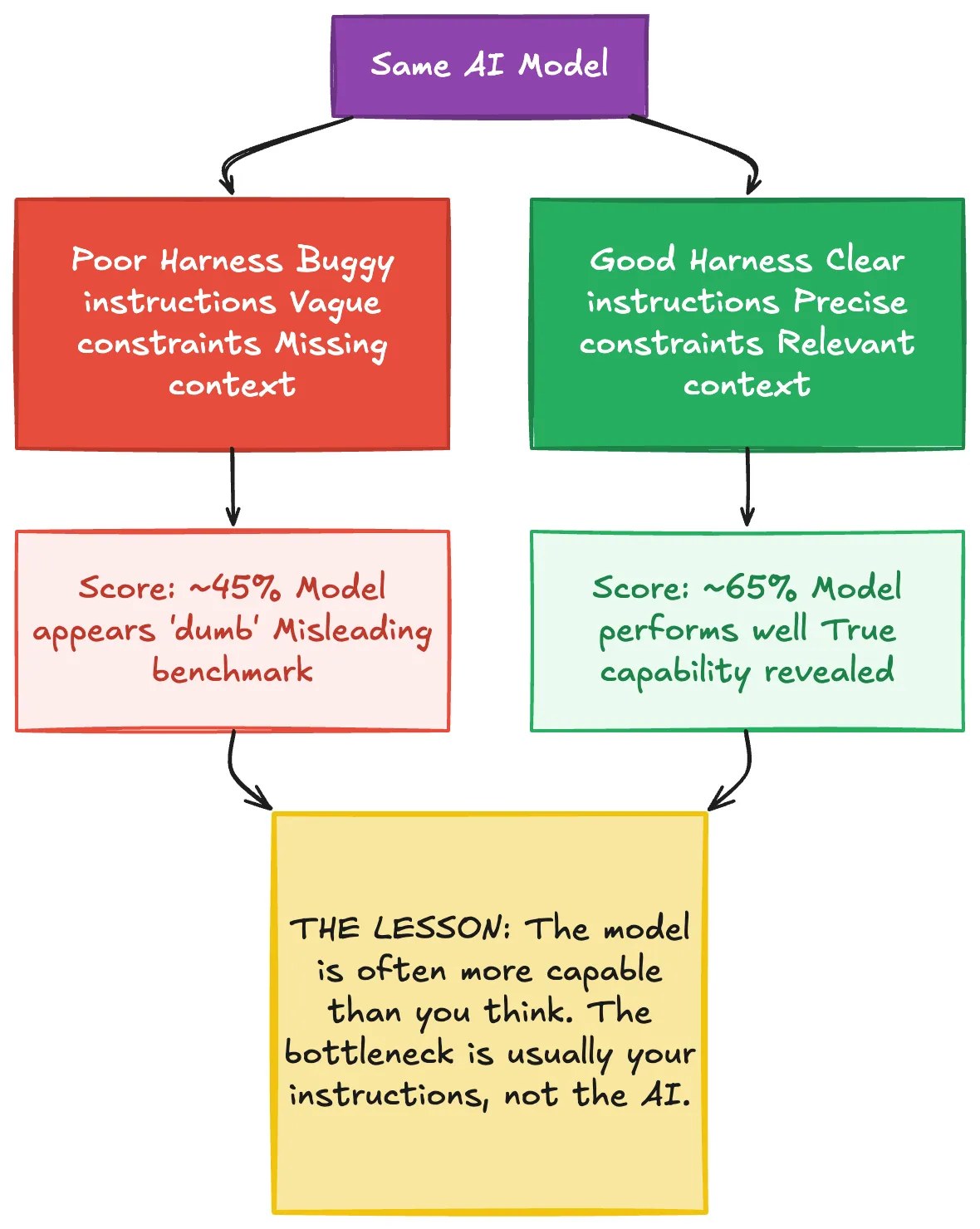
There’s a revealing anecdote from the development of a major AI coding platform. During internal benchmarking, a high-end model was scoring poorly — around 45%. The team was puzzled. They eventually discovered the problem wasn’t the model at all. The harness — the wrapper, instructions, and environment surrounding the model — had a bug. Once they fixed the harness, the score jumped to 65%.
The lesson is profound: the model is often more capable than you think. The bottleneck is usually in how you’re instructing and constraining it.
Temperature: The Creativity-Precision Tradeoff
AI models have a “temperature” setting that controls randomness. High temperature produces creative, novel outputs — great for brainstorming. Low temperature produces deterministic, predictable outputs — better for strict coding tasks.
In most AI coding platforms, you can’t directly control temperature. But you can influence it through how you prompt. Giving strict rules (”Never output functions longer than 21 lines”) pushes behavior toward precision. Open-ended requests (”Explore some approaches to this problem”) pull toward creativity. The catch is that the AI might treat even your strict rules as recommendations rather than laws — another reason to stay in the driver’s seat.
Part 7: “Vibe Coding” vs. Professional Engineering
There’s an important distinction between using AI to hack together a weekend project and using it to build production software.
“Vibe coding” — building something fun where mistakes don’t matter — is a perfectly valid use case. It’s how many people first experience the magic of AI-assisted development. But it’s a fundamentally different activity from enterprise engineering.
When a bug hits production, you cannot say “The AI wrote it.” The engineer is fully responsible for every pull request they ship. This isn’t a philosophical point — it’s the reality of professional accountability.
The workflows in this guide are designed for the professional context. They add overhead — planning, context management, separate debugging sessions, architectural review. That overhead exists because the cost of getting it wrong in production is orders of magnitude higher than on a weekend project.
Putting It All Together
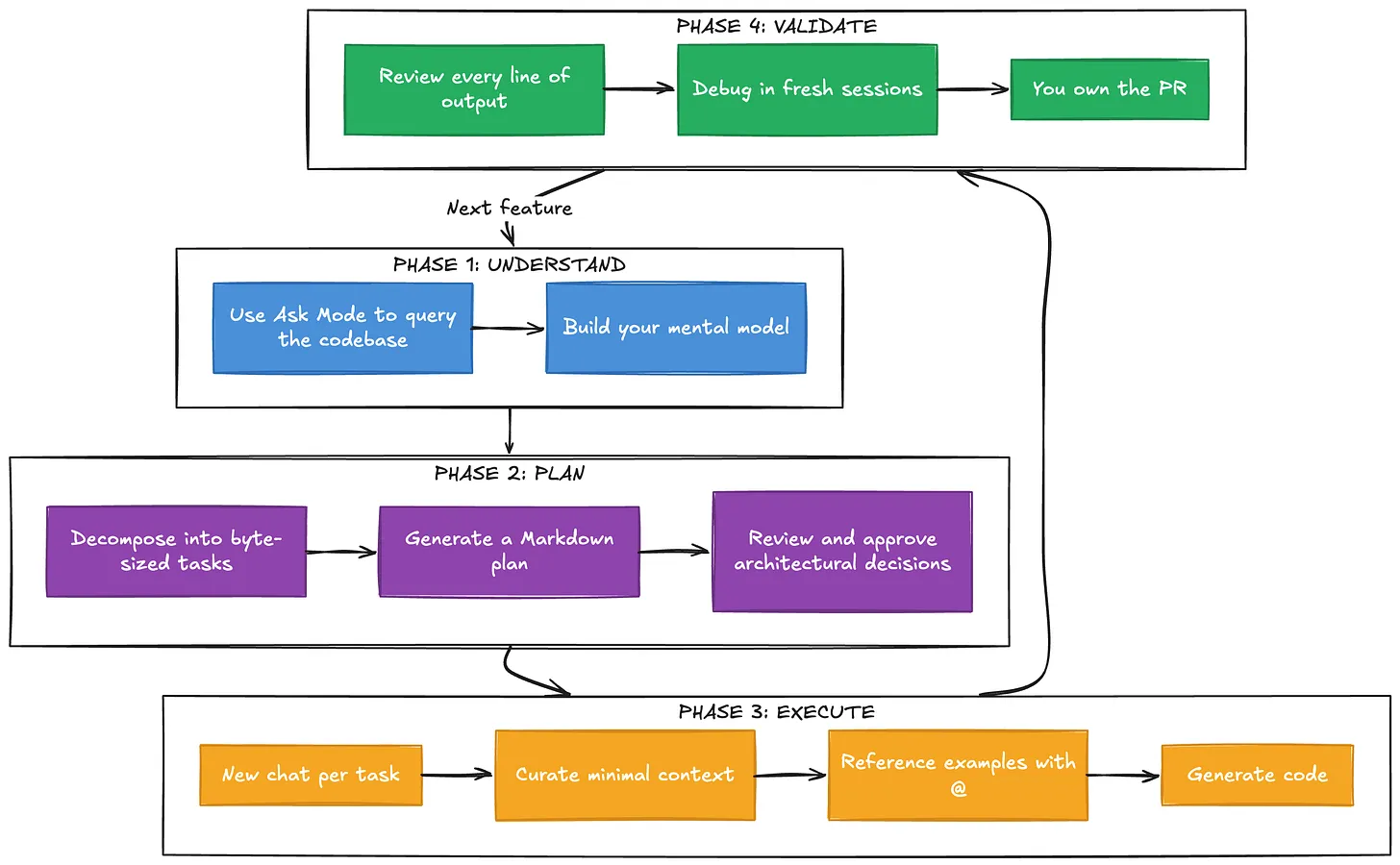
The complete picture looks like this: you break problems down, plan before coding, manage context ruthlessly, use separate sessions for separate concerns, leverage existing code as examples, define strict harnesses for greenfield work, and maintain accountability throughout.
None of this is complicated. But it requires discipline — the discipline to slow down when the tool makes it easy to go fast, to think when the tool makes it tempting to just generate, and to take responsibility when the tool makes it easy to abdicate.
The developers who master this will build software faster and better than ever before. Not because the AI does the thinking for them, but because it handles the execution while they focus on what matters: the architecture, the strategy, and the quality of the final product.
Dive in
Related
Blog
The Complete Guide to Claude Code Hooks: Automating Your AI Coding Workflow
By Subham Kundu • Jun 16th, 2026 • Views 196
Video
From A Coding Startup to AI Development in the Enterprise
By Ryan Carson • May 10th, 2024 • Views 640
Blog
The 5xP Framework: Steering AI Coding Agents from Chaos to Success
By Médéric Hurier • Apr 21st, 2026 • Views 230
Blog
The Complete Guide to Claude Code Hooks: Automating Your AI Coding Workflow
By Subham Kundu • Jun 16th, 2026 • Views 196
Blog
The 5xP Framework: Steering AI Coding Agents from Chaos to Success
By Médéric Hurier • Apr 21st, 2026 • Views 230
Video
From A Coding Startup to AI Development in the Enterprise
By Ryan Carson • May 10th, 2024 • Views 640